
Author: g edwards

  • What Soil Health Taught Me About Learning Design

    What Soil Health Taught Me About Learning Design

    I kill houseplants. Not all of them , but enough that I’ve started paying closer attention to why. And the deeper I get into apartment gardening in the middle of the Phoenix desert, the more I notice how much of it overlaps with the work I do every day as an instructional designer.

    That’s not a metaphor I’m reaching for. It’s something I actually think about while I’m repotting a fiddle leaf fig that’s somehow both overwatered and dying of thirst.

    You Can’t Force Growth

    My family has farmed in Iowa for generations. Long before I knew what “capacity building” meant in a professional development sense, I watched it happen in a field. You don’t make corn grow faster by yelling at it or by dumping on more fertilizer and hoping for the best. You build the conditions, the soil structure, the nutrients, the water, the spacing, and then growth happens because the environment finally allows it to.

    Learning works the same way. You can’t force someone to retain a process by cramming more slides into a course or repeating a policy three times in bold text. That’s the L&D equivalent of dumping fertilizer on dead soil and wondering why nothing’s coming up. If the conditions aren’t right, if the learner doesn’t have the context, the motivation, or a reason the new skill actually matters to their day-to-day, no amount of content is going to make it stick.

    Soil Health Is Invisible Until It Isn’t

    Here’s the thing about soil: when it’s healthy, you don’t think about it at all. The plant just grows. It’s only when something’s wrong, yellowing leaves, stunted growth, a wilting stem, that you start digging around (literally) to figure out what’s missing.

    Good instructional design works the same way. Nobody emails you to say “great job, this onboarding course had excellent scaffolding and a logical objective hierarchy.” They just… do their job well, faster, with less hand-holding from their manager. The design is working precisely when it disappears into the background. You only notice instructional design when it’s bad, when the course is confusing, the objectives don’t match the assessment, or new hires are still asking the same questions three weeks in.

    This used to bother me a little, honestly. But it’s also the best compliment the field can get. Healthy soil doesn’t ask for credit. Neither should good design.

    Different Plants, Different Soil

    Anyone who’s tried to keep more than one houseplant alive in a desert apartment knows this fast: what works for a succulent will absolutely murder a fern. They don’t need the same water, the same light, the same soil composition. Treating every learner like they need the same “watering schedule” is one of the fastest ways to lose them.

    This is where my teaching background and my plant-killing hobby actually agree with each other. A classroom of twenty-five kids never learned the same way, at the same pace, for the same reasons, and neither does a room of new hires going through onboarding. Some need more context before they can apply a skill. Some need to just try it and fail safely first. Some need the “why” up front or they’ll mentally check out by slide four. Universal Design for Learning isn’t just an accessibility checkbox, it’s an acknowledgment that one watering schedule doesn’t work for every plant in the room.

    Capacity Building Is the Real Goal

    In agriculture, the long game isn’t a single good harvest, it’s building soil that can sustain growth season after season without collapsing the moment conditions change. That’s regenerative agriculture in a sentence: build a system resilient enough to keep producing, not just a system that produces once.

    That’s the version of L&D I actually want to practice. Not a one-and-done training that checks a compliance box, but learning experiences that build a kind of organizational soil health, where people have the underlying capability, confidence, and judgment to keep adapting long after the course is over. A single great onboarding session is a good harvest. A culture where people are actually equipped to keep learning is healthy soil.

    I still might kill the next plant I bring home. But I’ve gotten a lot better at asking the right question first: not “why isn’t this growing,” but “what does this thing actually need in order to.”

    That question, it turns out, is the whole job.
  • Story Board – Psychological Safety

    Story Board – Psychological Safety

    Project Brief

    Most manager training on psychological safety fails at the same point: it teaches the concept without teaching the moment. Managers can define psychological safety after a training. What they struggle to do is recognize the specific seconds where they either build it or erode it, and respond differently when it counts.

    The real gap is not knowledge. It is behavioral fluency. A manager who aces a knowledge check can still respond defensively when a team member flags a risk in a post-mortem. The gap lives in the space between knowing what to do and knowing what to do right now, when it costs something.

    “A team that doesn’t feel safe won’t warn you. They’ll just watch it happen – and assume you didn’t want to know.”

    This module closes that gap not through content delivery, but through decision pressure. Learners don’t read about psychological safety. They experience what it feels like to build it or miss it, one choice at a time.

    DESIGN APPROACH

    The module follows a single fictional manager, Jordan, through one high-stakes week at Vantage Co. after a missed product deadline. A team member, Priya, discloses that she flagged the risk weeks earlier but did not feel safe to escalate it. The learner plays Jordan across three critical moments: an immediate public response, a one-on-one follow-up conversation, and a company-wide all-hands, each of which compounds the previous one.

    The branching logic uses a cumulative variable (Safety_Score, range 0–6) rather than discrete right/wrong paths. This was a deliberate structural choice: psychological safety is not built or destroyed in a single interaction. It accumulates across small moments. A module that resets between scenes cannot teach that. One that carries a hidden score forward, shaping the ending without interrupting the narrative can.

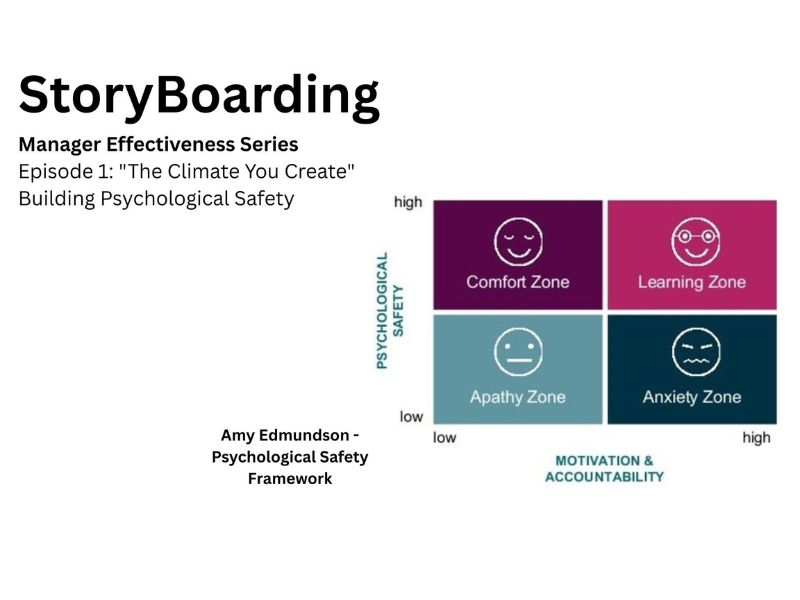
    Amy Edmondson’s four-stage framework is introduced through Jordan’s internal monologue after the first branch, framed as the manager “figuring it out”, not as a content delivery slide. This keeps learners in narrative mode throughout and avoids the cognitive break of a lecture insert mid-scenario.

    KEY DESIGN DECISIONS

    The framework lives in reflection, not a slide. The most dangerous option isn’t the obvious wrong answer.The ending is earned, not explained. Completion, not score, drives the SCORM trigger.The Leadership Snapshot avoids score-as-judgment.
    Introducing Edmondson’s model through Jordan’s internal monologue, rather than a content screen, keeps the scenario unbroken and the learner emotionally invested. The theory lands because the learner has just experienced the gap it describes.In Scene 4, the intuitively generous choice, “You have my word, come to me first, always”, is the lowest-scoring response. It creates manager dependency rather than team-wide safety culture. This mirrors a real pattern in well-intentioned managers. The feedback layer surfaces this without shaming.Both endings play as a flash-forward to the next sprint, same room, same team, different energy. The contrast is carried by body language and narration tone, not a results screen. Learners infer the consequences rather than being told it, which makes the emotional weight land harder. This is a behavioral practice environment, not a knowledge assessment. SCORM completion is set to Passed/Incomplete, not Passed/Failed, keeping the tone developmental rather than evaluative.  The outro surfaces the learner’s three choices as a behavioral pattern, not a number. The framing is reflective consistent with how adults process feedback about their own interpersonal behavior.

    REFLECTIONS AND LESSONS LEARNED

    • Narrative investment requires character specificity. Vague characters produce vague stakes. Jordan and Priya needed readable body language cues and distinct professional contexts for learners to feel the weight of the choices. Instructional designers are also character writers.
    • Branching architecture is a content problem before it’s a Storyline problem. Mapping the Safety_Score variable and convergence points on paper before opening the authoring tool saved significant rework. The logic only works if the narrative supports accumulation, which required thinking through story beats first.
    • The best distractors mirror real manager behavior. The most instructionally valuable options are not wrong answers — they are what managers actually do when they mean well but miss the mark. Designing those required genuine empathy for the learner, not just content analysis.
    • Less consequence narration, more consequence showing. Early drafts over-explained branch outcomes. The final design leans on visual storytelling, team body language, room energy, Priya’s posture, and trusts the learner to read it. That restraint makes the emotional impact stronger.

    Scene 01 Cold Open – The Moment LINEAR / NO INTERACTION

    VISUALAUDIO / NARRATION / NOTES
    SLIDE 1.1 – ESTABLISHING

    Wide shot: Vantage Co. conference room. 8-person table, modern but slightly sterile. Jordan stands at the front. Team seated, a mix of mild discomfort and distraction visible in body language. A slide on the screen reads: “Q3 Post-Mortem.” Clock on wall: 10:04am.
    Narrator (VO): “Every team has a climate. Not the kind you can measure with a thermostat. The kind that determines whether people speak up, or stay quiet.”
    On-screen text: Vantage Co. Post-Mortem Review

    Soft ambient fade in. No dramatic music, understated.
    SLIDE 1.2 – PRIYA SPEAKS

    Medium shot on Priya. She hesitates, glances at her notes, then looks up. Slight tension in her expression, this is costing her something to say.
    Priya is a mid-level engineer. She looks competent but uncertain in this moment.
    Priya (dialogue): “I know this isn’t easy to hear, but… I flagged the API risk in week two. I didn’t feel like it went anywhere, so I just, kept going.”

    Brief silence. Room shifts. Someone straightens up.SL NOTE: Use character animation with slight pause before Priya speaks. This beat of hesitation is important, don’t rush it. 1.5s ambient pause before her line.
    SLIDE 1.3 – JORDAN’S BEAT

    Close-up on Jordan’s face. A flicker of something, defensiveness? Surprise? The reaction is ambiguous. The team watches Jordan.
    Hold on Jordan’s face for 2 full seconds before transition.
    No narration. Room silent.

    On-screen text fades in: “What Jordan does next will shape what this team is willing to say, for months.”

    Learner prompt: “You are Jordan. How do you respond?”

    Transition to Scene 2 (Branch Point 1).SL NOTE: This slide uses a trigger, text fades in with a 2s delay after slide loads. Advance button labeled “Take Jordan’s Seat →” rather than default “Next.”

    Scene 02 Branch Point 1 — The Immediate Response BRANCH POINT · 3 OPTIONS · VARIABLE SET

    VISUALAUDIO / NARRATION / NOTES
    SLIDE 2.1 – CHOICE PRESENTED
    Same conference room. Jordan is in frame, standing. Three dialogue options appear as clickable response cards below Jordan’s image. Clean layout, no radio buttons, styled as “speech bubbles” the learner selects.
    Options styled differently, visual weight communicates nothing about which is “right.” All three look equally plausible.
    Learner selects Jordan’s response. No narration during selection.

    Option A: “Why didn’t you escalate it properly? There’s a process for that.”
    → Defensive. Jumps to process before acknowledging Priya. Sets variable: Safety_Score = 0

    Option B”: Okay, let’s make sure we capture that in our learnings doc. Now, solutions: what can we do differently next sprint?”
    → Dismissive (well-intentioned). Moves on too fast. Sets variable: Safety_Score = 1

    Option C” Priya, thank you. That takes guts to say in this room. I want to hear more about what made it hard to raise, can we talk after?”
    → Open + accountable. Sets variable: Safety_Score = 2

    SL NOTE: Set variable “BP1_Choice” = A/B/C. Variable “Safety_Score” accumulates across all 3 branch points (max 6). Affects ending trigger at Scene 7.
    SLIDE 2.2 A / SLIDE 2.2 B / SLIDE 2.2C – CONSEQUENCE SCENES

    Short consequence beat for each path. Same room, ~5 seconds. Body language tells the story: team shrinks slightly (A), team goes neutral / Priya nods but deflates slightly (B), team visibly exhales / Priya’s posture opens (C).
    Consequence plays before merging back to Scene 3.
    Path A consequence VO: “Jordan answered the process question. But Priya heard something else entirely.”

    Path B consequence VO: “A missed moment. Not malicious, just fast. Priya files it away.”

    Path C consequence VO: “Three words: ‘that takes guts.’ The team felt it too.”

    All paths merge at Scene 3.

    SL NOTE: All three consequence slides use identical slide layout, swap character states only. Reuse base Storyline layer, trigger character swaps via state changes.

    Scene 03 Reflection Interlude – Jordan’s Internal Model REFLECTION / FRAMEWORK INTRO

    VISUALAUDIO / NARRATION / NOTES
    SLIDE 4.1 – SCENE SET
    Small breakout room or hallway. Just Jordan and Priya. More intimate framing, camera closer. Priya has her laptop bag, as if she caught Jordan after the meeting. Body language: cautious but open.

    Warmer lighting than the conference room. This should feel like a different kind of conversation is possible here.
    Narrator (VO): “Jordan gets a second moment. These moments don’t announce themselves – but they’re where trust is actually built.”

    No music. Ambient quiet.

    SL NOTE: Scene 4 only triggers if learner selected Option B or C in Scene 2. If Option A was selected, a brief “Jordan reconsidered” bridge slide plays first, a short piece of narration that gives Jordan a reason to seek Priya out. This keeps the learning accessible without rewarding the poor choice.
    SLIDE 4.2 – EXCHANGE 1

    Conversation sim layout. Jordan speaks first. Two-panel format: Priya on left, Jordan’s response options on right.


    First exchange sets tone.
    Jordan opens: “Hey, what you said in there mattered. I want to understand what made it hard to bring this up earlier.”

    Priya responds: “Honestly? I wasn’t sure it would land. The last time I raised a concern in a sprint review it kind of got… minimized.”

    Learner selects Jordan’s follow-up:

    Option A: “That shouldn’t have happened. Who minimized it?”
    → Defensively problem-solves. Pulls focus away from Priya. Safety_Score +0
    Option B: “I hear you. I don’t want you to feel that way on this team. What would help?”
    → Empathetic but slightly performance-y. Moves to solutions too fast. Safety_Score +1
    Option C: “That’s on me to fix. Can you tell me more about what that experience was like?”
    → Takes ownership + stays curious. Safety_Score +2
    SLIDE 4.3 – EXCHANGE 2


    Continuation of same scene. Priya’s posture shifts based on Jordan’s previous response, slightly more or less open.
    Priya’s state carries forward visually.
    Priya (adjusted based on path): “I guess I just need to know that when I flag something, it’s not going to get buried or turned back on me.”

    Learner selects Jordan’s response:

    Option A: “I can’t promise everything gets acted on, but I promise it’ll be heard.”
    → Honest but slightly hedging. Neutral effect. Safety_Score +1

    Option B: “You have my word. Come to me first, always.”
    → Over-promises. Creates dependency rather than team culture. Safety_Score +0
    Option C: “That’s a reasonable thing to need. Let’s figure out together how to make that the norm, not just between us, but on the whole team.”
    → Expands psychological safety as shared responsibility. Safety_Score +2


    SL NOTE: Option C in Exchange 2 is intentionally subtle, many learners will pick Option B thinking it sounds most supportive. Feedback layer should unpack the over-reliance dynamic gently.

    Scene 05 Team Ripple Effect — Flash Forward CONSEQUENCE SCENE / NO INTERACTION

    VISUALAUDIO / NARRATION / NOTES
    SLIDE 5.1 — TWO WEEKS LATER
    Title card: “Two weeks later.” Then: a team standup. Same cast, same room, but something is different. If Safety_Score ≥ 3: team is engaged, people are leaning in, one person raises a concern easily. If Safety_Score < 3: team is polite but flat, answers are short, eye contact minimal.

    Visual contrast carries the argument, don’t over-explain in narration.
    High-score path VO:“Two weeks. That’s all it takes for a small shift to start compounding. One person speaking up makes it easier for the next.”
    Low-score path VO:“Two weeks. The team is still functioning, but quietly. The concerns that exist haven’t disappeared. They’ve just gone somewhere Jordan can’t see them.”

    SL NOTE: Branch content based on Safety_Score variable. High ≥ 3, Low < 3. Slides share same layout, swap character states and VO audio files only.
    SLIDE 5.2 — FRAMEWORK CALLBACK
    Brief reappearance of the 2×2 matrix, this time partially filled or fully filled depending on score. Visual metaphor: Jordan’s choices have been building (or eroding) each quadrant.

    Short, 10 seconds max. Reinforce without over-explaining.
    VO: “Psychological safety isn’t built in a summit or a retreat. It’s built in the moments no one else is watching.”
    Matrix fills in, or shows gaps, corresponding to learner’s accumulated choices. Then: transition forward to Scene 6.

    Scene 06 Branch Point 3 – The All-Hands BRANCH POINT · HIGH STAKES · DETERMINES ENDING

    VISUALAUDIO / NARRATION / NOTES
    SLIDE 6.1 – SCENE SET
    Larger conference space or all-hands setup. More people visible, this is a cross-team meeting. Jordan stands at the front, about to address the Q3 miss with the broader group. Stakes are higher here. Priya is visible in the audience.

    This moment is public. Everyone is watching how Jordan handles accountability.
    Narrator (VO): “One more moment. Jordan is about to address Q3 in front of the broader team. How Jordan frames this will tell everyone, not just Priya – what kind of team this is.”

    SL NOTE: Raise the emotional stakes with pacing, this slide should breathe. Add subtle underscore music for the first time in the module. Keep it minimal.
    SLIDE 6.2 – THE CHOICE
    Jordan at the front of room. Three response cards appear, framed as what Jordan says when addressing Q3 directly.
    Most consequential branch. This determines ending path.
    Context setup: “Jordan, addressing the all-hands: ‘I want to talk briefly about what happened in Q3 and what we’re doing differently.’”

    Option A: “There were some communication gaps that led to the delay. We’re putting better processes in place.”
    → Vague / diffuse accountability. “Communication gaps” is corporate non-language. Safety_Score +0

    Option B: “The team flagged risks I didn’t act on fast enough. That’s on me, and here’s specifically what I’m changing.”
    → Direct, specific, models the behavior. Safety_Score +2 → Triggers Ending A if total ≥ 4

    Option C: “I think we all learned a lot from Q3. Mistakes happen, what matters is how we move forward.”
    → Positive spin, no real accountability. Feels good, signals nothing useful. Safety_Score +0

    Scene 07 Module Endings – Two Arcs CONDITIONAL · TRIGGERED BY SAFETY_SCORE

    VISUALAUDIO / NARRATION / NOTES
    ENDING A – GROWTH ARC
    Return to the same conference room from Scene 1. Next sprint planning meeting. Priya is speaking — and the team is leaning in. Someone else raises a concern. Jordan listens. Room energy: alive.
    ENDING A – SAFETY_SCORE ≥ 4Small moments compounded. Something real shifted.
    Narrator (VO, Ending A): “Psychological safety doesn’t announce itself when it arrives. But you’ll know it’s there, because your team will tell you things they’re afraid to tell you.”

    Final beat: Priya catches Jordan’s eye, gives a small nod. Freeze frame. Slow fade.

    SL NOTE: Ending A plays before the Outro/snapshot. Warm color grade, positive ambient sound. Runtime: ~45 seconds.
    ENDING B – STAGNATION ARC
    Same sprint planning room. Priya is present but quiet. Someone starts to speak, glances at Jordan – thinks better of it. A risk goes unvoiced. Jordan doesn’t notice. Room energy: polite, guarded, functional.

    ENDING B – SAFETY_SCORE < 4Nothing broke. Nothing grew either.
    Narrator (VO, Ending B): “A team that doesn’t feel safe won’t warn you. They’ll just watch it happen, and assume you didn’t want to know.”
    Final beat: Freeze on the unvoiced concern. Slow fade. Then: a gentle prompt, “Want to try a different path?”

    Retry option appears: “Replay from Scene 2” button.

    SL NOTE: Ending B does NOT feel punitive, it should feel honest and thought-provoking. Tone in VO: not scolding, just clear. Learner must still proceed to Outro (no skip).

    Scene 08 Outro — Leadership Snapshot + Series Teaser OUTRO / JOB AID TIE-IN

    VISUALAUDIO / NARRATION / NOTES
    SLIDE 8.1 — YOUR LEADERSHIP SNAPSHOT
    Clean results screen. Shows learner’s three branch choices, displayed as a mini “decision trail.” Each choice is labeled and contextualized. No score number shown, only behavioral framing.
    Avoid score-as-judgment. Frame choices as data, not grade.
    Header: Your Leadership Snapshot

    Summary format per choice:Scene 2: Your response to Priya’s disclosure → [Choice A/B/C + 1-sentence behavioral read]
    Scene 4: Your one-on-one approach → [Choice + read]
    Scene 6: Your all-hands accountability framing → [Choice + read]
    Bottom line summary: 1–2 sentences on the overall pattern shown.

    SL NOTE: Snapshot generated dynamically using Storyline variables BP1_Choice, BP2a_Choice, BP2b_Choice, BP3_Choice. Use JavaScript trigger to concatenate feedback strings. Test all variable combinations in review.
    SLIDE 8.2 — DOWNLOADABLE REFLECTION CARD
    Clean one-pager preview. “The Psychological Safety Checklist for Managers”, styled as a job aid.
    Download button visible. Optional email prompt.

    Job aid reinforces Edmondson’s four stages with actionable manager behaviors.
    Job aid title: The Climate Checklist – Building Psychological Safety in Your Team

    Contents: 4 sections (one per safety stage), 3 manager behaviors per section, a “signals to watch for” column.

    PDF format. Downloadable via Storyline’s built-in attachment feature or LMS download link.SL NOTE: Test download functionality across LMS environments (SCORM 1.2 vs 2004). Some LMS platforms block attachment downloads, provide a fallback URL if needed.
    SLIDE 8.3 – SERIES TEASER
    Clean title card. Text only- no character reveal. Subtle design treatment suggests continuation.
    Leave them wanting Episode 2.
    On-screen: “Manager Effectiveness Series · Coming Next: Episode 2 – ‘The Conversation You’re Avoiding’ · Navigating feedback that feels like conflict.”

    No audio. Clean, confident end.

    Final slide: Module complete confirmation for LMS (SCORM completion trigger).SL NOTE: Set SCORM completion trigger on Slide 8.3. Use “Passed/Incomplete” not “Passed/Failed” – this is not a scored assessment. Completion = reaching final slide.
  • Developing Empathy at Work

    Developing Empathy at Work

    Case Study: Empathy Skills Training for Corporate Teams

    Tool: Articulate Rise 360
    Audience: Corporate team members across departments
    Delivery: Self-paced, asynchronous learning

    The Problem

    In fast-paced corporate environments, employees often face challenges balancing efficiency with empathy during workplace interactions. Misunderstandings, communication breakdowns, and reduced collaboration can impact team morale and overall performance. The goal of this course was to help employees develop empathy skills that support more effective communication and stronger working relationships.

    The Solution

    I designed a short, self-paced empathy training course using Articulate Rise 360 to introduce core empathy concepts and their application in the workplace. The course emphasized practical strategies employees could immediately apply to everyday interactions with colleagues, clients, and stakeholders.

    Instructional Design Approach

    • Defined empathy as a learnable workplace skill tied to communication and collaboration
    • Used short scenarios to illustrate common workplace interactions and challenges
    • Incorporated reflection prompts to encourage perspective-taking and self-awareness
    • Applied adult learning principles by grounding content in real workplace contexts
    • Designed content with accessibility and inclusivity in mind, using clear language and logical structure

    Soft Skills / Culture-Building Training 

    Designed to support communication, collaboration, and inclusive workplace practices.

    Outcome / Impact

    Learners developed a clearer understanding of how empathy influences communication, collaboration, and workplace culture. The course supported more thoughtful interactions and helped reinforce empathy as a shared organizational value.

    Reflection & Iteration

    If I were to expand this course, I would add scenario-based branching activities that allow learners to practice empathetic responses and see the impact of different choices. I would also incorporate follow-up microlearning or discussion prompts to encourage continued reflection and reinforcement over time. These enhancements would help strengthen long-term behavior change and embed empathy more deeply into day-to-day workplace interactions.

  • Customer Service Short Course

    Customer Service Short Course

    Case Study: Customer Service Foundations Short Course

    Tool: Articulate Rise 360
    Audience: Customer-facing employees across various industries
    Delivery: Self-paced, asynchronous learning

    The Problem

    Organizations often struggle to deliver consistent customer experiences across teams due to varying communication styles, confidence levels, and approaches to challenging interactions. The goal of this course was to provide a scalable learning solution that would help team members develop foundational customer service skills while applying them to real-world scenarios.

    The Solution

    I designed a self-paced customer service course using Articulate Rise 360 that blended instructional content with applied learning opportunities. The course was structured into short modules that introduced key concepts and immediately reinforced them through practice, allowing learners to build confidence and competence incrementally.

    Instructional Design Approach

    • Designed modules around core customer service competencies such as communication, empathy, and problem-solving
    • Incorporated scenario-based case studies to mirror real customer interactions
    • Used role-play simulations and interactive knowledge checks to reinforce learning
    • Applied adult learning principles by prioritizing relevance, practice, and reflection
    • Structured content to support accessibility and reduce cognitive load through clear layout and concise language

    Outcome / Impact

    Learners gained a stronger understanding of effective customer service strategies and how to apply them in everyday interactions. The course supported consistent messaging and expectations across teams, helping organizations improve the quality and reliability of customer experiences.

    Reflection & Iteration

    If I were to iterate on this course, I would enhance the learning experience by incorporating branching scenarios that allow learners to see the consequences of different response choices in real time. I would also introduce role-specific pathways so content could be tailored to different customer-facing roles, increasing relevance and engagement.
    Additionally, I would integrate post-course performance support tools, such as quick-reference guides or conversation frameworks, to help learners transfer skills directly to the job. These enhancements would further strengthen confidence, reinforce consistency across teams, and support long-term behavior change rather than one-time knowledge acquisition.In future iterations, I would expand the role-based scenarios and add branching decision points to further personalize the learning experience and deepen skill transfer.

  • Introduction to Airtable Data System

    Introduction to Airtable Data System

    Case Study: Data System Onboarding for Internal Teams

    Link: file:///Users/graceedwards/Downloads/content-3%202/index.html#/

    Tool: Articulate Rise 360
    Client: Arizona State University – Learning Experience Office
    Audience: Internal staff members within the Learning Experience Office
    Delivery: Self-paced, asynchronous onboarding course

    The Problem

    The Learning Experience Office at Arizona State University developed a new internal data system to support team workflows and reporting. Because the system was custom-built, staff needed a clear, consistent onboarding experience that would allow them to quickly understand the system’s purpose, functionality, and how it fit into their day-to-day responsibilities.

    The Solution

    I designed a self-paced onboarding course using Articulate Rise 360 to introduce team members to the new data system. The course provided a structured walkthrough of the system, key processes, and expectations for use, allowing staff to learn at their own pace while minimizing disruption to ongoing work.

    Instructional Design Approach

    • Collaborated with subject matter experts to translate technical system knowledge into clear, user-friendly learning content
    • Aligned content to real workplace tasks rather than feature-based instruction
    • Applied adult learning principles by emphasizing relevance, efficiency, and immediate application
    • Organized content into short, digestible lessons to reduce cognitive load
    • Designed with accessibility and usability in mind, including clear language and consistent navigation

    Outcome / Impact

    The course supported a smoother rollout of the new data system by giving team members a centralized, on-demand resource for onboarding. Staff were able to reference the course as needed, reinforcing learning and supporting consistent system usage across the team.

    Reflection & Iteration

    If I were to iterate on this course, I would incorporate more scenario-based practice and role-specific examples to further support transfer of learning and increase confidence in using the system.

  • Future Technology: DISCO

    Future Technology: DISCO

    DISCO System

    DISCO stands for Direct Innovation System for Comprehensive Operations. It is a room within a school that allows you to go back in time to meet famous people who were at some of the most historical events of human history. An idea from early on in the 21st century was libraries where you could learn about historical events told by people who lived them. You could “check out” someone who lived in the great depression instead of just reading it in a book. Now we can build on that idea and create simulations of learning starting in second grade and endless applications afterward. Using all of the data in recorded history, we can accurately develop simulations where learners can talk with Benjamin Franklin about his science experiments, do an investigation and learn how DNA structures were discovered with Rosalind Franklin. You could learn about the age of enlightenment with Jean-Jaques Rousseau as your guide. The DISCO system is truly a party.

    How it works

    The DISCO system integrates learning into a whole other plane of existence. With specific rooms retrofitted with panels to create simulations for learning,  you can talk to famous philosophers like Plato, Aristotle, and John Locke. Have a history lesson from Abraham Lincoln or learn how to row a Viking ship with Leif Erikson. All of these are achievable with the DISCO system. Using pre-programmed simulations, after entering the simulation room and closing the door, teachers can say, “Edwards class Grade three Vikings lesson 1, students can immerse themselves in their learning. In each school, a teacher can take from second grade through high school students into the simulator to learn how the world works or talk to someone famous, which is way better than reading some textbook. 

    Technology 

    The four technologies to build this system are the Internet of Things (IoT), AI automation, Extended reality, and Hadoop – open-source software facilities to hold all the data needed for the simulation. The internet of things provides vast information from every part of the world and can be scaled down to fit the parameters of each lesson set by the curriculum standards. Each simulation will be created by computer programmers that can last from 15 – 45 minutes. How to store this amount of data for each grade’s simulation, Hadoop, a software storage facility, will hold all necessary information and programming. The final piece of the puzzle is how to pay for the electricity it would take to run this simulation room. Solar panels and other forms of clean energy, such as geothermal, wind, and water power, would generate enough power and not create more greenhouse gasses. 

    Learning 

    Starting in second grade, students learn about Greek myths. Integrating all of the information available on the internet and students following the stories of Demeter and Persephone, Theseus, and the Minotaur. Onto third grade, where they learn about Ancient Rome: having students talk with each of the Roman gods and goddesses. When learning about Mesopotamia living amongst the peoples and how they built their buildings and lived without electronics and air conditioning. Working our way all the way to high school when students are required to take half a year of government and talk to George Washington and Benjamin Franklin. After that Econ, they get to learn how an economy works, the supply chain, and how things get done in the world around them. These simulations are hands-on and experiential learning experiences. There is no need for a test to have the students solve a problem in groups to test their newly acquired knowledge. According to Northern Illinois University, experiential learning allows the student to be “actively engaged in posing questions, investigating, experimenting, being curious, solving problems, assuming responsibility, being creative and constructing meaning. Students are engaged intellectually, emotionally, socially, soulfully and/or physically.” (Experiential Learning | Center for Innovative Teaching and Learning, n.d.). 

    Dependencies

    Dependencies include the security and integrity of the programs. Since these programs will be made by computer programmers, they should be given a test drive before being rolled out. The schools have to fund this facility’s building, which is good as it creates jobs, and many technology giants are more than likely to chip in towards the cost. Since the DISCO simulation is run by clean energy, the government offers incentives and pays for a portion of this room. The simulation room will need routine maintenance and a group of computer programmers as support to help if there is a glitch within the program. The security for creating this is more minor of a security threat than unauthorized access. Teachers will use retinal scans and their badges to enter the room. The room will require a headcount of how many bodies will be in the room, with a maximum of 30. Once inside, the teacher will instruct the AI system which program they wish to select from the list. Since the data is stored off-site, the room will have the units downloaded to the computer specified by each teacher at the beginning of each unit of study to not overload the system. The simulation will be monitored by an extensive data system to adapt in real time to the learning that is taking place and if remediation is needed. At the end of each day, the AI system will create reports for each class that has entered the room, in which students were on task and learned the necessary skills to move on. 

    Conclusion

    In 1750 Benjamin Franklin said, “Tell me, and I forget, Teach me, and I remember. Involve me, and I will learn”. He really had no idea what “involvement” meant for educators in the 21st century. This system creates one-of-a-kind learning experiences for each learner that enters the simulation space. Using all data from all over the internet and recorded history an accurate depiction of these people who have lived through some of the worst of times and some of the best can create a love for lifelong learning for every student.

    References

    Academic Standards. (n.d.). Arizona Department of Education. Retrieved November 13, 2022, from https://www.azed.gov/standards-practices

    Apache Hadoop. (n.d.). https://hadoop.apache.org/

    Burgess, M. (2018, February 16). What is the Internet of Things? WIRED explains. WIRED UK. https://www.wired.co.uk/article/internet-of-things-what-is-explained-iot

    Experiential Learning | Center for Innovative Teaching and Learning. (n.d.). Northern Illinois

    University. https://www.niu.edu/citl/resources/guides/instructional-guide/experiential-learning.shtml

     Journal of big data. (2014). Springer-Verlag, GmbH.